

A project OS for AI agents
Runs on Windows and Linux
Built around our proprietary Cyphor Engine™, PhanOS offers a wide range of tools, including a completely self-maintaining and accurate documentation base. It cuts the agentic cost of mapping, navigating and working on a codebase, a complex database, or any system that benefits from self-updating knowledge and staleness checks.
Pro runs in Claude Code. PhanOS Basic's plugin supports Claude Code, Codex and Cursor; the installer sets it up in Claude Code for now. You need your own Claude subscription or API access; PhanOS does not include AI model access or tokens.
Invite-only beta. Testers use Pro free for the whole beta.
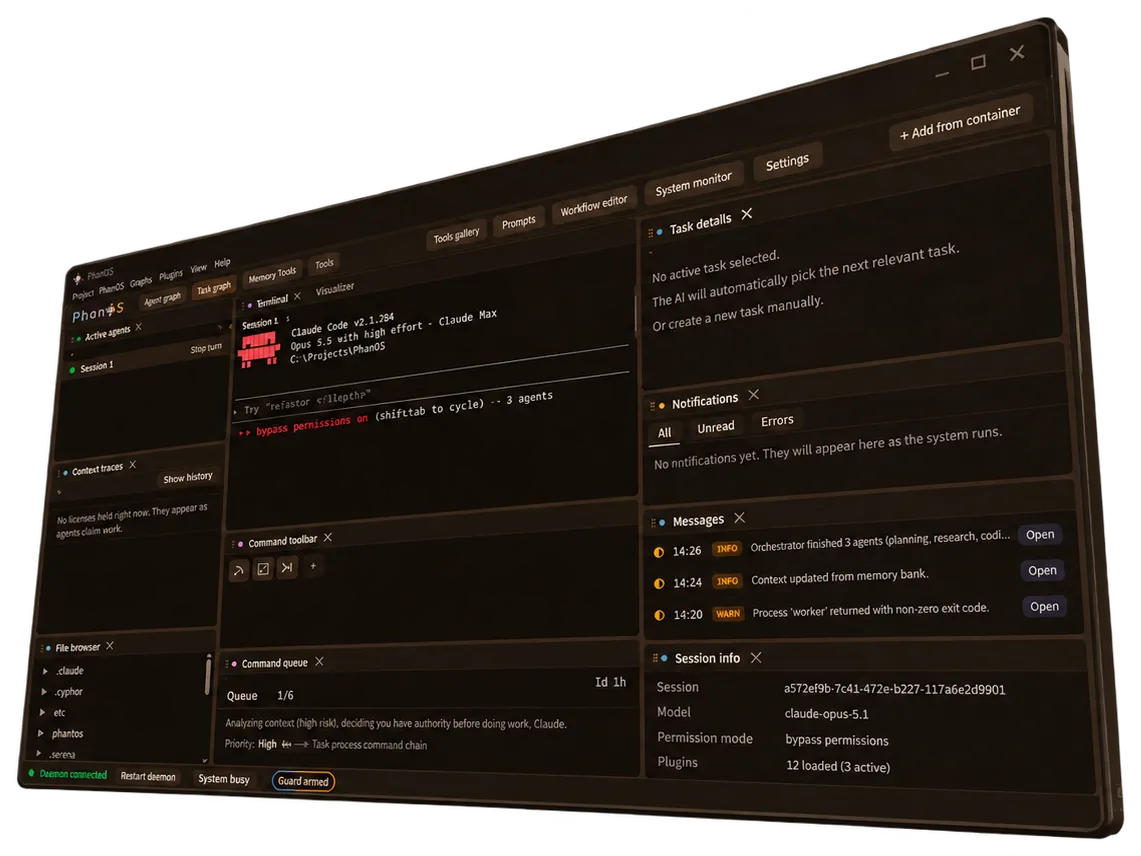
What makes PhanOS an efficient and powerful tool
Tools and features
- A UI built for agents, shaped by you
- A user-friendly desktop app that is easy to pick up, so you never have to remember a command. It is fully customisable: ask an agent to change a window or add a tool, and it builds it.
- Self-maintaining documentation, cheap navigation
- A scalable, automated documentation base that keeps itself current, with no user intervention needed. An advanced toolset lets agents navigate that documentation and memory cheaply, whatever its size or complexity.
- Agentic orchestration, your pace
- One orchestration workflow built for every situation: a conservative mode that runs agents one after another, or a parallel mode that lets dozens, even hundreds, of agents work on the same codebase.
- Collaborative mode Coming soon
- Cyphor's lease system lets other people connect their own CLI tools to your codebase, or to one hosted on a server, and work on it live together. No two agents edit the same file at once, so there are no tangled results.
- A library of grafts, plans and prompts Coming soon
- Module and app grafts, plans and prompts in one place: buy them, sell your own, or share them for free. A graft arrives already mapped by Cyphor and with its tests, so it drops into your codebase at a low token cost, and nothing in it runs when you load it.
- Beyond coding: templates Coming soon
- Cyphor's documentation and memory system can run AI-driven knowledge bases, where every change is recorded at once and your agents retrieve it with a fresh-or-stale verdict. Templates will be downloadable adaptations of the Cyphor engine for your personal, scientific or business needs, from clinical documentation to accounting and law. Talk to us about Cyphor for your field.
How does it work?
Each module delivers impressive results on its own. Together they reinforce each other and form a complete project operating system: PhanOS.
- The map and the locks
Cyphor
A hash-stamped note for every file, so agents know what to trust, and leases so they never collide.
- Move modules between projects
Graft
Copies a module with its tests and dependencies into another project, described and cited, with nothing run on load.
- The crew and the procedure
Phanes
A fixed crew of agent roles on matched model tiers. The cheapest tier that can do a job gets it.
- Watch and steer your agents
PhanOS UI
A desktop app that shows every agent and lease at a glance, and lets you cancel a command before it runs.
Cyphor
The map and the locks
Cyphor writes a short note for every file in your codebase and stamps it with the file's content hash. Change the file and the stamp no longer matches, so before an agent acts it is told whether a note is fresh and can be trusted, or stale and the file needs opening.
- More than 20 built-in commands and scripts let agents navigate by the notes instead of the files, so finding their way around goes from slow and expensive to fast and nearly free.
- They know what a file does and what depends on it without opening it, so they open only the files they have to edit.
- They stop asking you questions the codebase can already answer.
src/auth/session.tsCreates and rotates session tokens; read by middleware.tsfresh3f9a1csrc/billing/webhook.tsVerifies the provider signature, then updates the subscriptionstale, file changedc41d9bsrc/billing/retry.tsRetries failed deliveries with exponential backoffleased by agent 29be210docs/architecture.mdService boundaries and data flowstale11fd07
- A verdict before they act
- Each descriptor is either fresh, so the agent trusts it, or stale, so the agent opens the file. Documentation that knows when it is out of date can be relied on.
- Leases instead of merge fights
- Before writing, an agent claims the area it needs. Other writes there are refused at the tool call and again at commit, so parallel agents cannot collide.
- A receipt for every change
- When an agent finishes it declares the files it changed. PhanOS compares that with what moved on disk, and tells you which test results no longer hold.
Graft
Move modules between projects
A graft is a copy of a module, taken from one project so another project can load and adapt it: its code, its tests and the in-project code it depends on, byte for byte.
- Share your modules online with others for free, or buy and sell them. A graft arrives already mapped by Cyphor and with its tests, so it drops into an existing codebase easily and at a low token cost.
- Nothing a graft declares is ever executed by Graft itself. Its description is read as data, never as an instruction, so loading a graft cannot run foreign scripts.
- The module
- Its code, its tests and its in-project dependencies, copied byte for byte.
graft.json- A manifest of where the module came from and what it needs.
GRAFT.md- A cited description of its purpose, API surface, dependencies and assumptions, written by an agent.
- Cyphor hashes
- Its content hashes and Cyphor mapping, so integrating it into a new codebase saves tokens, time and money.
How it connects
- Phanes
- It uses Phanes to extract a module, and through the skills it gives Phanes, the module drops into another project and is understood from the start.
- Cyphor
- It extracts a module together with its standardised Cyphor hashes and documentation.
- PhanOS UI
- Generate and load commands are a click away in the PhanOS UI, so you can create a graft or load one into your codebase without typing a command.
Phanes
The crew and the procedure
Phanes is the execution system: a fixed crew of agent roles, each pinned to a model tier, and the procedure they follow. Work is triaged by size before it is dispatched, and the cheapest tier that can do the job gets it.
- Several agents work at once, within a ceiling, each in its own non-overlapping scope.
- An independent verifier re-derives the results at the close. Its output is a graded flag, never a fix.
- Every finding carries an ID, a severity and a quoted source line, so it can be checked later.
- A self-improving memory: Phanes learns how you work and what you prefer, and remembers it.
| Role | Model tier | Job |
|---|---|---|
| Orchestrator | careful | Sizes each task before it is dispatched, then assigns it |
| Fetcher | cheap | Reads and summarises; the cheapest tier that can do the job |
| Author | working | Writes code inside the area its lease covers |
| Reviewer | careful | Takes the risky decisions and reviews |
| Verifier | independent | Re-runs everything at the close and flags problems; never fixes them |
PhanOS UI
Watch and steer your agents
The PhanOS UI is a desktop app for Windows and Linux, built around the agent session so you never have to remember a command. It is made for watching and steering agents rather than reading code.
- Every agent and every lease at a glance, with sub-agents nested under their session and several sessions per project.
- Commands wait in a queue with a timer, 30 seconds by default and editable, so you can take one back before it fires.
- Stopping a single sub-agent revokes its lease. A stop button halts the whole turn.
- A live 3D map of the code, a leases panel showing region, cluster and cell, and a file browser.
- A fully customisable toolbar that holds PhanOS's own commands, other plugins' commands or ones you create.
- Panels collapse, resize and can be customised: tell an agent the feature you want in a window, and it builds it for you.
Plans
Free protects you from false and colliding results. Pro saves money and time. Compare plans.
Install in Claude Code
- Add the PhanOS installer.
claude mcp add llmdhub -- npx -y @llmdhub/mcp - Sign in. Ask Claude to run
phanos_loginand confirm the code in your browser. Every install needs an account, Basic included. - Install. Ask Claude to run
phanos_install. The package signature is checked before a single file is written. - Start a new Claude Code session. Pro loads as
phanos@llmdhub-pro, Basic asphanos@llmdhub-basic.
Full install guide, including updates and removing a device.